 Beatcast
♥ Heart rate app for iPhone and iPad
Your heart rate stays on screen
Start a session and the number moves into the Dynamic Island and onto the Lock Screen. It stays there while you are in another app, and while the phone is locked and face down on a bench. Glance, do not unlock. Prop the phone up instead and it fills the screen, readable from across the room. You need a sensor for this. Most straps and arm bands speak the standard Bluetooth heart rate service, a Polar H10 or a Wahoo TICKR among them, and Beatcast reads it.
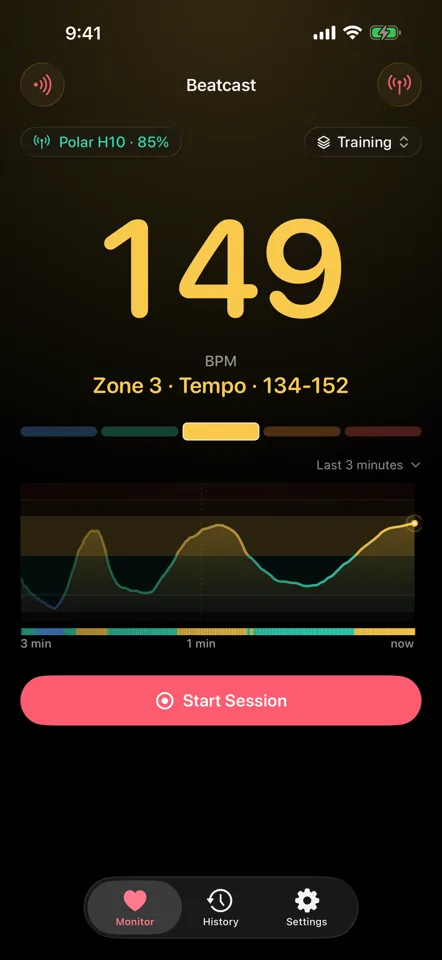
Built for a glance
The whole app assumes you get about a second to look.
It starts simple, too. A new install shows your heart rate and zone and records a session, and not much else. Advanced features, one switch in Settings, adds zone profiles, more alert options, the rest coach, calories and broadcasting.
The sensor you already have
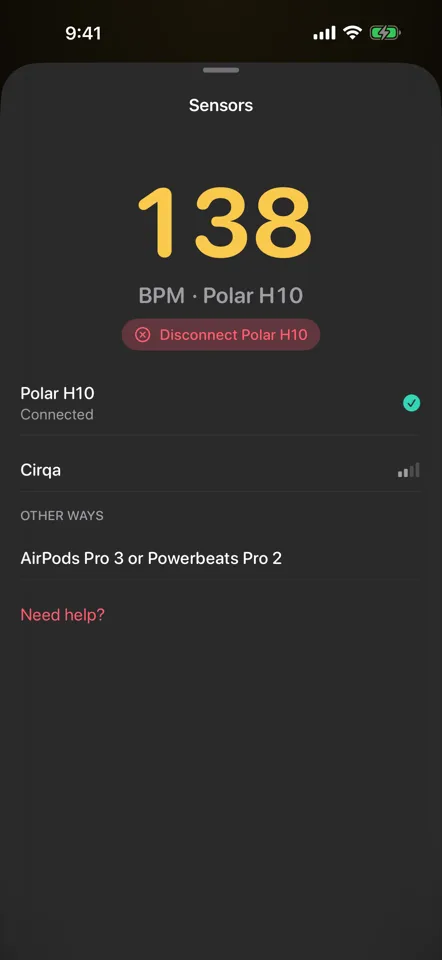
Beatcast needs a sensor. Most that speak the standard Bluetooth heart rate service work, worn wherever you prefer them, and straps and arm bands usually speak it out of the box. Choose it once and Beatcast finds it again next time. If the signal drops, it reconnects on its own.
- Chest, arm, wherever it reads, with or without a display
- Also on iPhone: AirPods Pro 3, through Health
- If it stays lost, a notification tells you
Four places to put the number
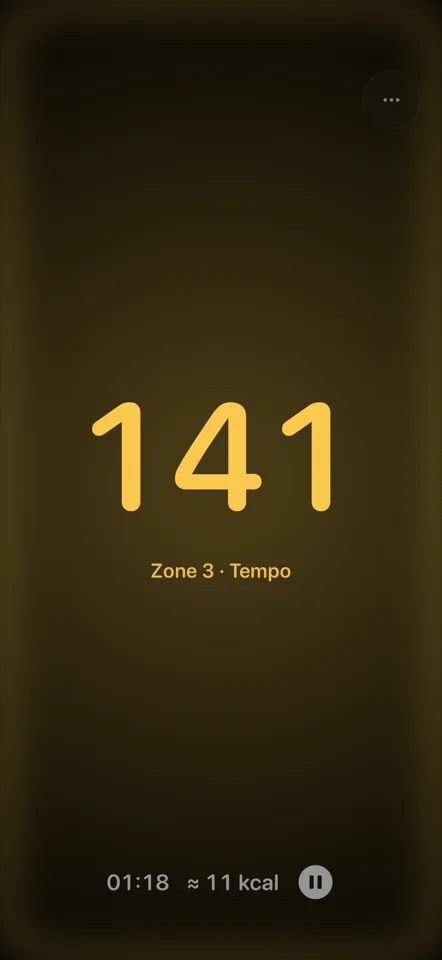
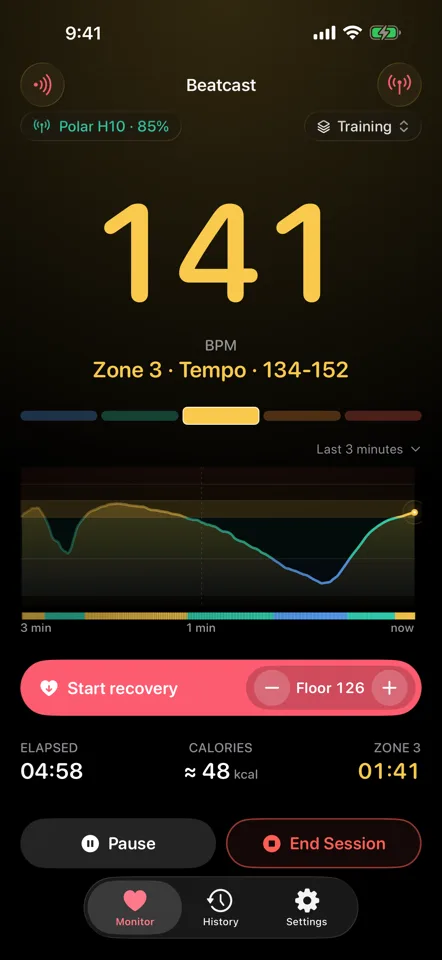
The readout is huge and takes the colour of your zone. The colour spreads to the whole screen, so you know where you are before you read a digit.
- Dynamic Island and Lock Screen while a session runs
- Home screen widgets for your last reading with the time it was taken, and your last session
- Full-screen mode when the phone is propped up in front of you. With Advanced features on, add a clock or flip it to read in a mirror
Your heart rate, while the phone is doing something else
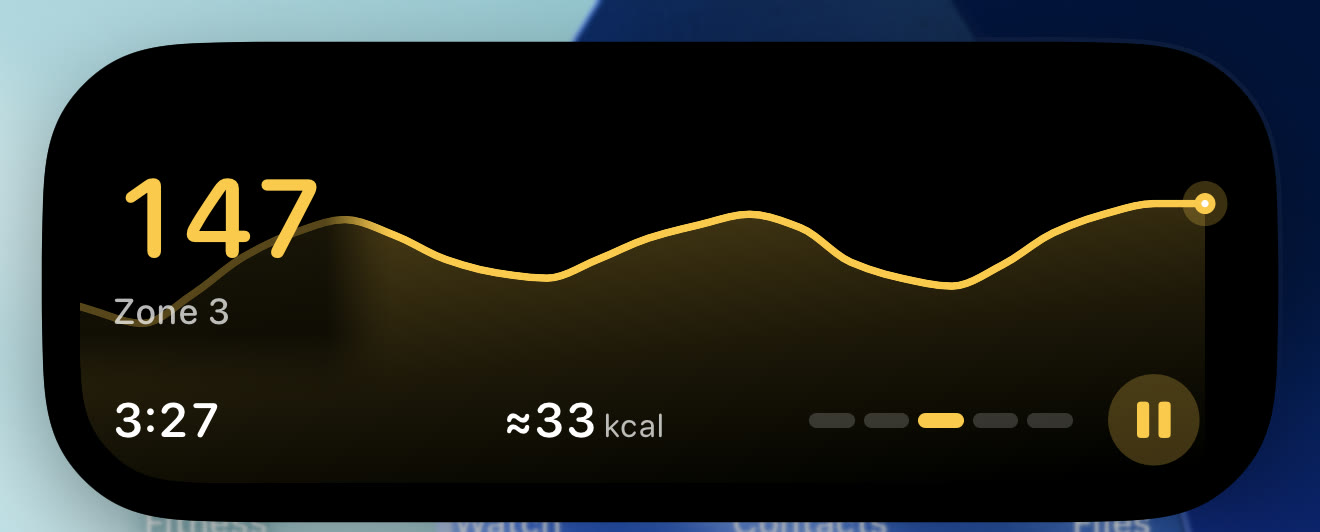
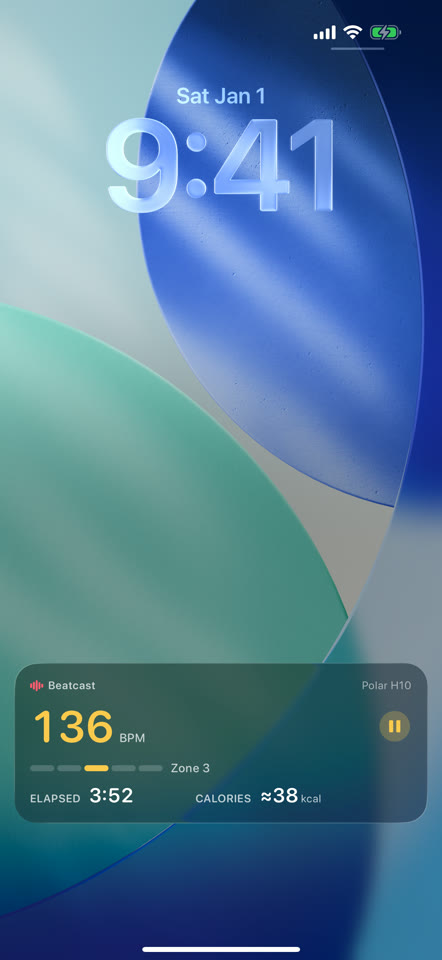
With a Bluetooth sensor, Beatcast keeps recording after you leave the app. Put the phone away, put music on, answer a message. The number stays in the Dynamic Island, and the whole card is on the Lock Screen.
- Closed: the reading, in the colour of the zone you are in
- Held open: zone, trend, elapsed time, and pause
- On the Lock Screen: the whole card, without unlocking anything

For training, or for winding down
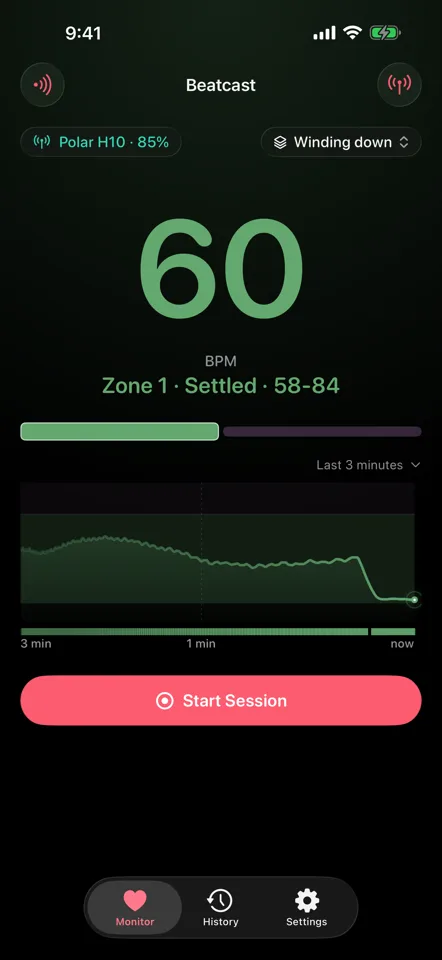
A zone is a heart rate range with a name you chose. Five of them, named after training efforts, suit most workouts. Ten at night is different. The point then is to watch the number fall.
With Advanced features on, keep a zone profile for each and switch between them on the Monitor. Start one from a template, from Strength and Intervals to Mindfulness and Overnight, or build your own. Winding down starts with two zones just above your resting rate. Each profile has its own names, colours, target zone, alerts and rest coach.
- Two, three or five zones, each one renamed however you want
- Three colour palettes, one of them colour-blind safe, or a colour per zone
- A floor alert that says when you have settled, so you can stop watching
- Switch during a session and the new zones start with the next one
- Each session remembers the zone profile it was recorded with
Alerts that get through
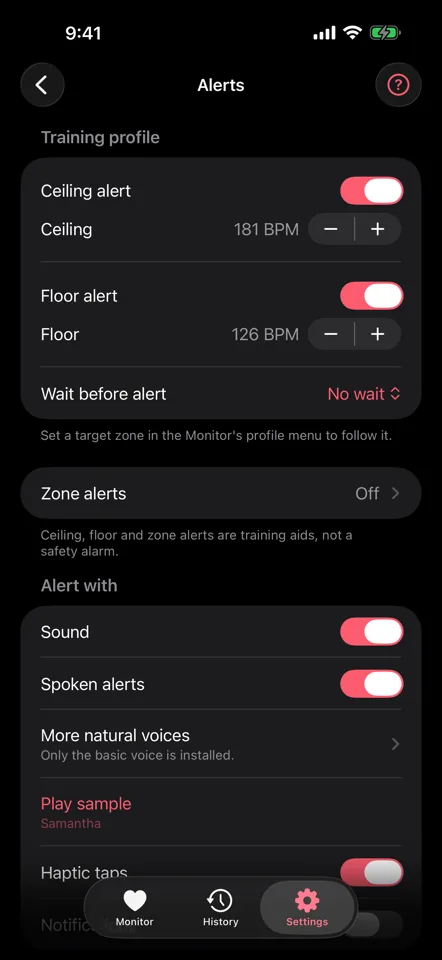
A ceiling for going too hard, a floor for settling back down. In Basic, one switch alerts you with a sound and a tap when you leave your target zone. Advanced features adds the rest. The ceiling and the floor can each follow your target zone or sit at a number you set. Wait before alert, from 15 seconds to 10 minutes, holds an alert until your heart rate has stayed out of range that long. A zone alert is a different thing: a cue when your heart rate enters a zone you picked. Sound and speech duck your music, so the phone can stay in your pocket.
- A short sound, the spoken value, haptic taps, a notification
- One or several of the four, chosen separately for each zone profile
- A time check if you want one: the session time and your heart rate, spoken at the interval you pick
- On Apple Watch: notifications while you wear it unlocked and your iPhone is locked, and in Beatcast on the watch, a tap when your zone changes
Sessions kept reading by reading
A session keeps each reading your sensor sends, about one a second for most sensors, with no averaging on the way in. A boundary crossing goes in the log once the new zone has settled, so one spike does not fill it.
- Time in each zone, and the moment you crossed into it
- Weeks in History: a page for each week with your time in each zone and a bar towards your weekly goal, ready to share as slides or a short video
- A summary when you end a session: length, average and time in each zone
- Each session keeps its zone profile, so an old one still reads right
- Search by tag, note or zone profile, and sort by date, length or average heart rate
- Resting heart rate for each session, the lowest one-minute average in it
- Export as CSV or TCX, one session or a whole list, and save to Apple Health if you switch it on
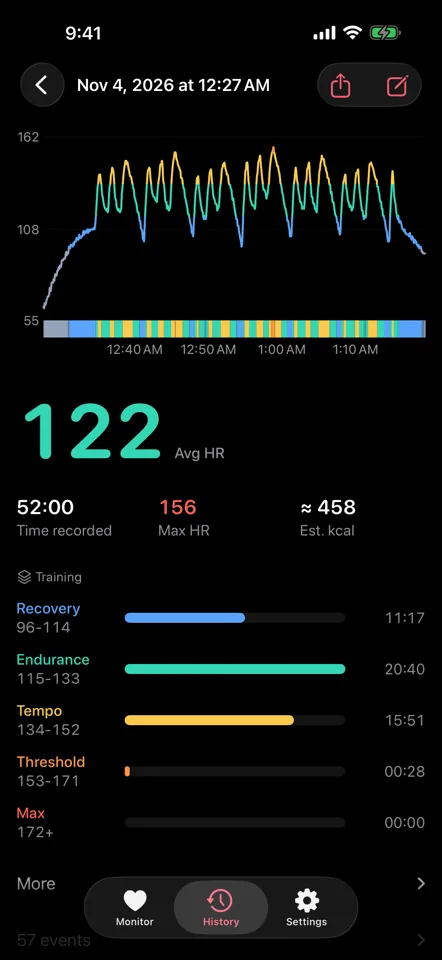
Share a finished session
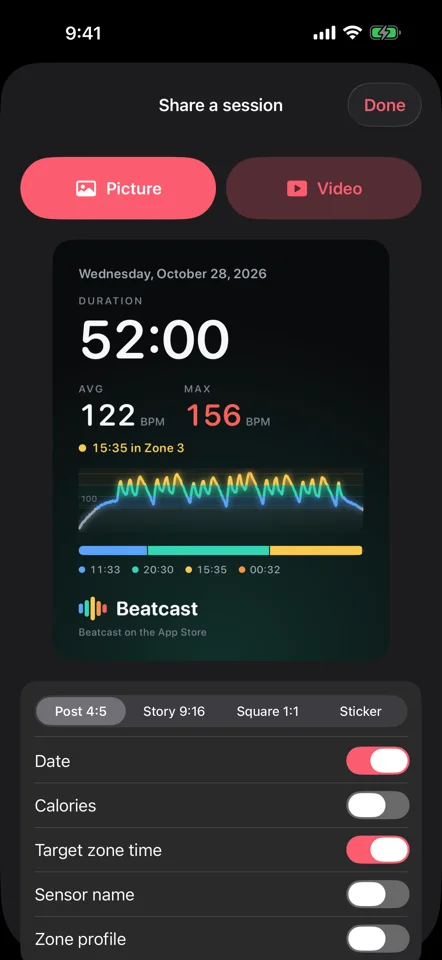
A finished session has a Share button in History, and Save & Share turns up as a session ends. You get a picture for a post, a Story, a square or a sticker, or a short video of your heart rate curve drawing itself. Beatcast makes both right there on your iPhone or iPad. The Instagram and TikTok buttons save it to Photos and open the app, and More opens the share sheet.
- A switch each for the date, calories, a record badge, the sensor, the zone profile and tags
- Your time in the target zone, when the session had one
- The sensor, zone profile and tags start off, and your choices are kept for next time
- Never your notes or the time of day, so a post cannot tell anyone when you were out
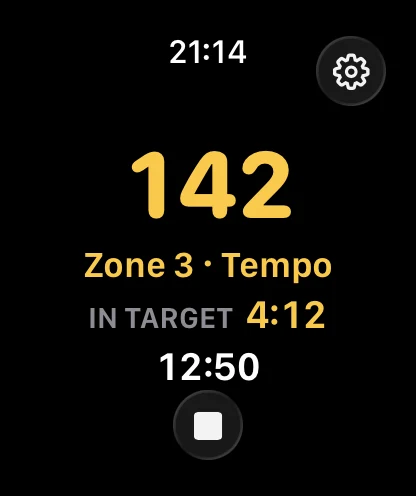
Your strap's heart rate on Apple Watch
Wear your strap or arm band as usual. Beatcast on your iPhone passes the reading to your wrist, in your zone colour. Time in zone and the session time sit under it. The phone can stay in your bag, where it was going anyway.
- Start and end a session from your wrist, with a tap when the zone changes
- Heart rate and zone as complications on your watch face
- Needs an iPhone paired with an Apple Watch on watchOS 26 or later, with Beatcast running on the iPhone
Start, pause, end and ask from outside the app
Once your sensor is sending, you can start a session with Siri, Spotlight or the Shortcuts app. Pausing, resuming and ending work without opening Beatcast, so the app you had open stays on screen. Handy when the doorbell goes.
- Start Session and End Session as controls in Control Center, on the Lock Screen or, on iPhone 15 Pro and later, on the Action button once you assign it in Settings
- If your sensor has not started sending, Beatcast opens and tells you why
- End Session saves the running session from Siri, the Shortcuts app or a control, without opening Beatcast
- Ask "What's my heart rate in Beatcast?" with Siri to hear your heart rate, your zone and the time recorded so far
- Finished sessions turn up in Spotlight and in the Shortcuts app
An optional calorie estimate
Calories, if you want them. The estimate is off by default, and it needs your weight and your sex, entered in Settings under Personal details once Advanced features is on. Switch it on and a running session shows a calorie figure next to the heart rate and the elapsed time. It is active energy, the part you burn above resting, worked out on the phone with a published equation (Keytel et al. 2005) from your heart rate, weight, age and sex. The calories burned by heart rate calculator runs the same equation in your browser.
Studies comparing heart rate estimates with measured energy use find them within about a fifth, averaged over many people on a steady aerobic effort. Your own figure can be off by more. A strength set, intervals or a hot room will push it further out. Under about 90 BPM it stops counting, because that is where heart rate and oxygen uptake stop keeping step. Your weight and sex are used for this and for nothing else. Beatcast never reads them from Health, which is why it asks.
- Calories, once switched on, go with the session to the Lock Screen, your history, the exports, and Apple Health if you save sessions there
Your iPhone, pretending to be a strap
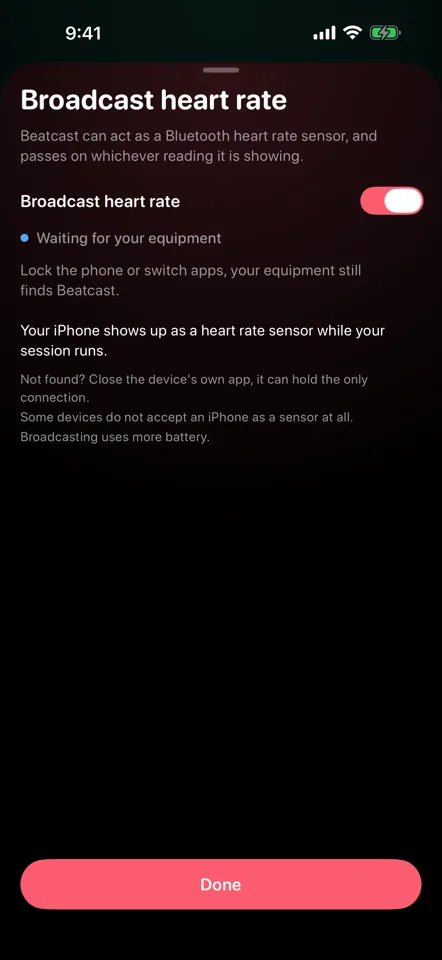
Beatcast can advertise itself as an ordinary Bluetooth heart rate monitor, so supported apps and equipment pair with your iPhone the way they would pair with a strap. Many sensors hold one connection at a time by default, so this is one way to reach Beatcast and your equipment at once. Your phone talks to them directly. Nobody else is involved.
- Indoor training apps and cardio equipment that support a Bluetooth heart rate monitor
- The standard heart rate service, so on the Beatcast side you only switch on Advanced features, then broadcasting
- Shows up to your equipment during a session, locked or not. Outside one, keep Beatcast on screen
What people use it for
Some of these are about effort and some about winding down. With Advanced features on, each can have its own zone profile, and you switch between them on the Monitor.
Strength training
Your lifting app counts sets and reps and stays quiet about your heart rate. Beatcast runs alongside it, showing the number while you get your breath back.
With Advanced features on, tap Start recovery after a set. The rest coach times the rest and says when your heart rate reaches the floor you set. Switch on automatic start and it spots the drop by itself.
Endurance work
An hour in zone 2 is an hour of not wanting to look at your phone. The whole screen takes the colour of your zone, so a glance is enough.
A zone alert says when you have found zone 2. A ceiling alert speaks up by sound, speech, taps or a notification once you drift above it.
Winding down
Some days the number you care about is the one going down. The Winding down zone profile starts with two zones just above your resting rate, and the readout follows you down after a hard day.
A floor alert says when you get there, so the phone can lie face down until it does.
Breathing practice
You bring the practice. Beatcast brings the number, and it answers a beat or two behind your breathing, as fast as your sensor reports.
There is no pacer in Beatcast and no guided session. It is the live display and the log, next to the practice you already follow.
Bands with no screen
A band with no display is a fine idea right up until you want the number. The Garmin Cirqa leaves the screen out by design, which is part of how it stays on day and night. Beatcast puts the live reading on a screen you already own.
The Cirqa broadcasts over ANT+ and Bluetooth, and Beatcast reads the Bluetooth side.
Indoor bike and treadmill
Your bike or your treadmill wants a monitor of its own. If it supports a Bluetooth heart rate monitor, Beatcast passes your sensor's reading through to it, or to a training app, so the machine and your phone agree on the number.
To the machine, your phone looks like an ordinary Bluetooth monitor, and during a session it shows up even when the phone is locked. Prop it up where you can see it.
On iPhone Duo, too
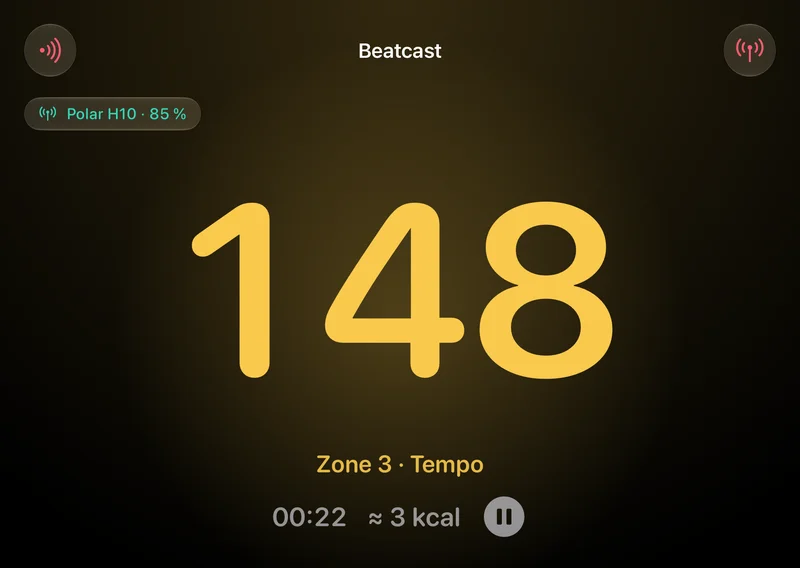
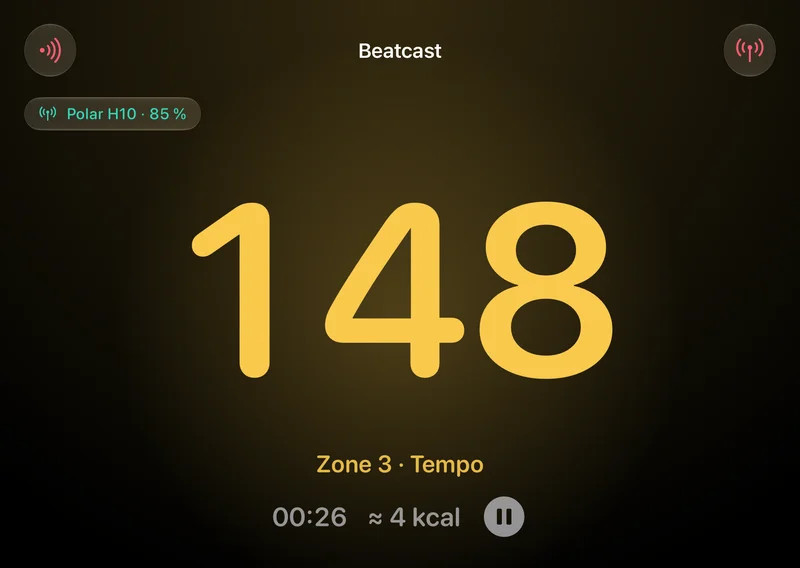
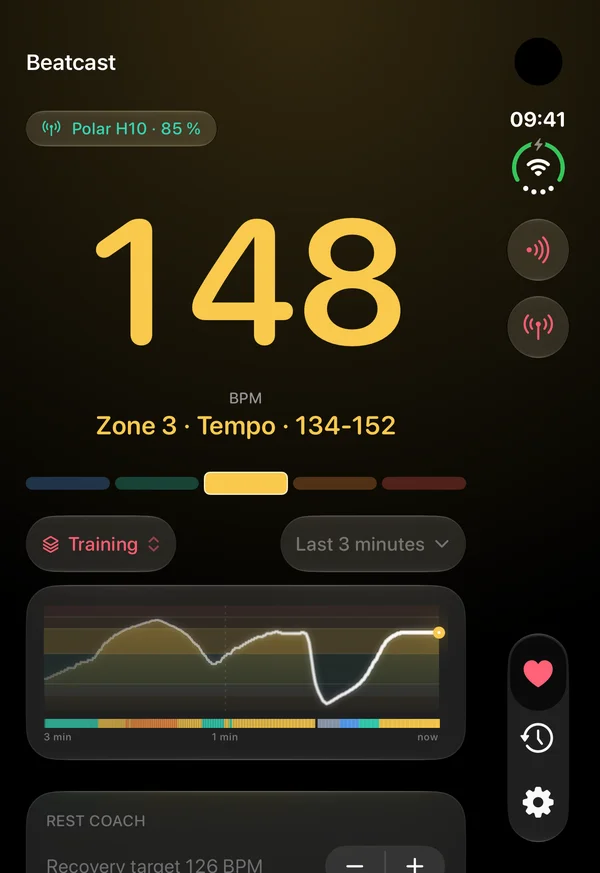
Chances are your phone does not fold. If you use Beatcast on iPhone Duo, though, it changes shape with the phone, and each way you prop or open the phone gets a layout of its own. Closing it never pauses or ends a session.
-
Unfolding. Open the phone during a session and the number grows with the hinge, up from the fold. Close it and the number shrinks back.
-
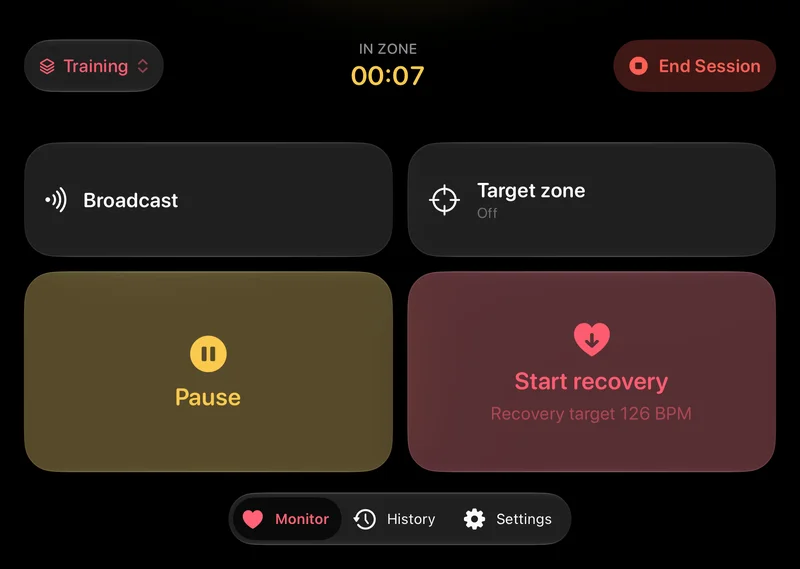
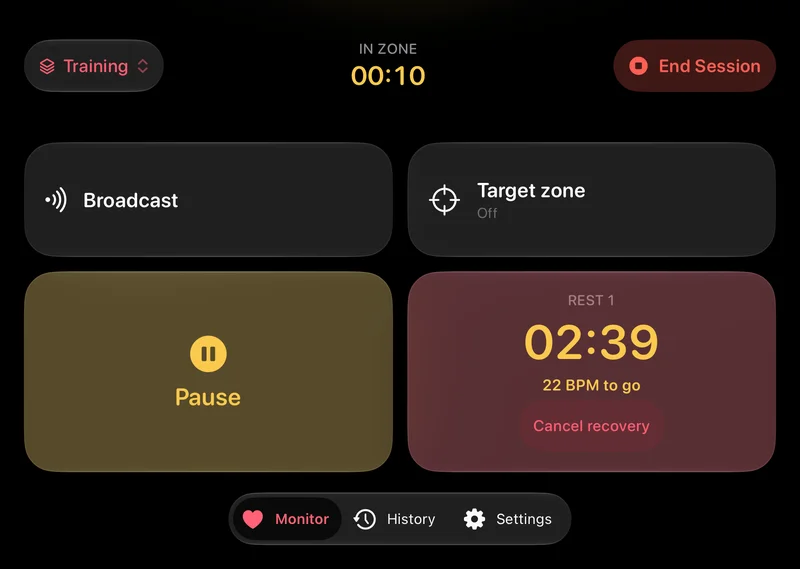
Console. Half-folded on a table, the top half is the heart rate, as large as the half allows, with your zone and elapsed time. The bottom half sits at thumb height, with pause, a Start recovery button that turns into the rest timer, broadcast status and a target zone. Pick a zone to hold, and the edge of the screen pulses when you leave it.
-
Tent. Stand the phone up like a tent while it charges, and the session shows in StandBy, readable from across the room. When your heart rate reaches your floor, the rest countdown flips to Recovered. The numbers turn red when the screen dims, for the nights you leave it running by the bed.
Works with
Beatcast speaks the standard Bluetooth heart rate service. There is no per-brand code and no allow-list, so if your device broadcasts, it works. Most straps do it out of the box. Most watches need it switched on first.
Straps and bands
Broadcast by default. No setting to find.
Polar H10, H9 and Verity Sense. Garmin HRM-Dual, HRM-Pro and HRM 200. Wahoo TICKR and TICKR FIT. Coospo, Magene, Decathlon and Scosche bands. Screenless bands need switching on once, and the FAQ has the steps.
What it runs on
iPhone and iPad, on iOS or iPadOS 26 or later.
On an iPad the app lays itself out as a stationary display, for a tablet propped up where you can see it from where you are working.
The Dynamic Island part needs an iPhone that has one, and on the others the same card appears on the Lock Screen. With Live Activities switched off, a session runs without one.
Watches, once broadcasting is on
Most sports watches keep the radio off to save battery, and have a mode that turns it on.
Newer Garmin watches, COROS, Polar, Amazfit models with Heart Rate Push can all do it, and so can a Whoop band. Suunto's Race 2, Vertical 2, Race and Race S can too, once their heart rate broadcast is on. Each hides the setting somewhere different, so the steps are in the FAQ.
Not an Apple Watch, though. I know of no Apple broadcast mode.
A spot check, with the camera
A fingertip held still over the camera and the flash gives a number after a few seconds, with the app open. That works on an iPhone, and on an iPad only if it has a flash.
It is an estimate, less accurate than a sensor, so I do not save it as a session. Handy for a quick look.
What I have not got working
I found no statement from Oura that its ring broadcasts heart rate to other apps. Older ANT+ only Garmins need a bridge to Bluetooth, because I know of no iPhone with an ANT+ radio. Suunto watches before the April 2026 firmware, such as the 9 Peak Pro, have no broadcast. A Suunto chest strap does work.
Google lists the Fitbit Charge 6 as intended to work with the Bluetooth Heart Rate Profile. I have not confirmed that.
The Bluetooth® word mark and logos are registered trademarks owned by Bluetooth SIG, Inc. Apple, iPhone, iPad, Apple Watch, watchOS, AirPods, App Store, Apple Health, Dynamic Island, Siri, Spotlight, Smart Stack, StandBy and iOS are trademarks of Apple Inc. Powerbeats and Beats are trademarks of Beats Electronics, LLC. All other device and app names here are trademarks of their respective owners, used only to say which sensors Beatcast can read. Beatcast is an independent product and is not affiliated with, endorsed by or certified by any of them.
Got your device working? Report it in r/beatcast and it goes on the list. Many straps accept one connection at a time by default, and some accept two or three. One already paired to a watch or a bike computer may not be able to talk to Beatcast as well. Model by model.
Your data stays on your phone unless you send it somewhere
There is no Beatcast server to send anything to, and no account to attach it to. Your readings go somewhere else only if you send them there: an export you share, saving to Apple Health, or a broadcast to your own equipment.
No account
No sign-up, no sign-in, and no account to delete later.
No Beatcast server
Sessions and settings live on your device. There is nowhere for me to read them from.
No tracking
No analytics, no advertising identifiers, no third-party SDKs. The app makes no network requests of its own.
Your data, in open formats
Export a session as CSV or TCX and take it where you like.
Saving to Apple Health is optional
Off by default. Turn it on and finished sessions are saved to your own Health store. Beatcast reads heart rate from Health only while AirPods Pro 3 are your sensor.
Camera stays on device
Fingertip readings are analysed live on the phone. No frame is stored or uploaded.
The full detail is in the privacy policy.
One price, once
14 days free
with the full app unlocked, then a one-time purchase
No subscription, no renewals, no account. You pay once through the App Store and the app is yours.
Support
Questions, ideas and setup help go to r/beatcast, where the answer stays searchable for the next person who asks. For bugs or anything private, write to contact@beatcast.app. It comes straight to me.
Which heart rate sensors work with Beatcast?
Most sensors that implement the standard Bluetooth Heart Rate Service work, and most dedicated straps and arm bands implement it. Chest straps like the Polar H10 or H9, Garmin HRM straps, the Wahoo TICKR, Coospo and Magene straps, arm bands, and screenless bands such as the Garmin Cirqa. Wear it wherever you prefer. The position makes no difference to Beatcast.
Can I measure my heart rate without a chest strap?
Yes. An arm band, or any other Bluetooth heart rate sensor, speaks the same standard service as a chest strap. The position makes no difference to Beatcast. Apple Watch as the sensor does not work, though Beatcast on Apple Watch can show the heart rate from your strap or arm band. For a quick check, a fingertip over the rear camera and the flash gives a number after a few seconds of holding still, with the app open. That reading is an estimate, less accurate than a sensor, and it stays out of your session history.
Can I see my heart rate on Apple Watch?
Yes, from the strap or arm band connected to your iPhone. Beatcast on the watch shows the heart rate in your zone colour, with the zone under it. During a session, your time in zone and the session time show below. You can start and end a session from your wrist, and add Heart Rate or Zone to a watch face. The number is live while Beatcast is open on the watch. Complications refresh now and then.
What do I need to use Beatcast on Apple Watch?
An iPhone paired with an Apple Watch on watchOS 26 or later, and a heart rate sensor connected to Beatcast on that iPhone. Keep Beatcast running on the iPhone. Without a sensor, the watch asks you to connect one on your iPhone. Beatcast does not use the optical sensor on the watch, and on the watch it has no access to Health. Not on iPad.
Can I see my heart rate on the Lock Screen and in the Dynamic Island?
Yes. While a session runs, a Live Activity shows your current heart rate and zone in the Dynamic Island and on the Lock Screen. Outside a session there is no Live Activity. The home screen widgets are separate and not live: one keeps the last reading with the time it was taken, the other your last session.
Can I send my heart rate from my iPhone to gym equipment or a training app?
Yes. Your iPhone shows up as an ordinary Bluetooth heart rate monitor, so supported apps and equipment can pair with it and receive the reading. While a session runs, that works with the phone locked or another app open. Outside a session, keep Beatcast on screen.
Is Beatcast useful for strength training?
That is one of the reasons it exists. Most strength apps ignore heart rate entirely, so Beatcast runs alongside. You get a big readout to check between sets. Switch on Advanced features in Settings and the rest coach works on a tap: hit Start recovery after a set and it times the rest until your heart rate reaches your floor. Switch on automatic start and it spots the drop for you. The Strength template comes with the rest coach on.
How are the heart rate zones calculated?
From percentage of maximum heart rate, from heart rate reserve (Karvonen) or from a threshold heart rate, with two, three or five zones. You can rename the zones and set the boundaries yourself. Each session records time in zone.
Can I have different zones for training and for winding down?
Yes, as zone profiles. The first time you open Beatcast, pick Training or Winding down: Training is worked out from your age, Winding down sits just above your resting rate. Switch on Advanced features in Settings to add more, from Strength to Overnight, each with its own zones, colours, target zone, alerts and rest coach. You switch between them on the Monitor, and a switch during a session applies from the next one.
Can I export my heart rate data?
Yes. A session exports as CSV or TCX, so you can open it in a spreadsheet or load it into another training platform. The CSV is one row per reading: an ISO 8601 timestamp, the beats per minute, and the beat-to-beat intervals when your sensor sends them. Optionally, finished sessions are saved to Apple Health as a workout with heart rate samples.
Can I share a session on Instagram or TikTok?
Yes. Open a finished session in History and tap Share. Pick a picture in one of four formats, or a video of your heart rate curve drawing itself. The Instagram and TikTok buttons save it to Photos and open that app. More opens the share sheet for everything else. Switches decide what the card shows, and your notes and the time of day are never on it.
Is there a subscription?
No. Beatcast is free to try for 14 days with the full app unlocked, and after that a one-time purchase keeps it yours. No renewals, no account.
Does Beatcast need an account or an internet connection?
Neither. There is no sign-up and no Beatcast server, and your sessions and settings stay on your iPhone or iPad. The app makes no network requests of its own, and there is no analytics and no tracking. The purchase goes through the App Store, the way it does for other apps.
Can I keep my sessions when I get a new iPhone?
Yes, with a backup file. In Beatcast's settings, under Backup, Export backup saves your sessions and zone profiles in one file. Put it somewhere the new phone can reach, such as Files or your computer, then choose Import backup there. It adds what is missing and keeps what you have recorded or edited. The same works after a reinstall, and between an iPhone and an iPad. Best done before you wipe the old phone.
Does it keep recording with the screen off?
Yes, with a Bluetooth sensor. The session keeps recording in the background. Alerts still reach you, and Beatcast keeps the current number on your Lock Screen in a Live Activity. Notification alerts, one of the Advanced features, follow your Focus settings and also appear on a paired Apple Watch while you wear it unlocked and the iPhone is locked. If the sensor drops out, the session pauses itself after a minute and stops after ten.
Where do I ask a question or suggest a feature?
In r/beatcast. Asking in the open means the answer helps everyone who searches for the same thing later, and a feature request gets discussed where other people can add to it. Bugs and private matters are better by email, and the app has a "Send feedback" screen that composes one for you.
How do I switch broadcasting on for my watch or band?
Straps need nothing: put one on and it appears. Watches and screenless bands keep the radio off to save battery, and each maker hides the setting somewhere different.
Garmin Cirqa. Garmin Connect, then Garmin Devices, then your CIRQA, then Health & Wellness, then Broadcast Heart Rate, and turn Status on. To start it from the band instead, turn on Device Control in the same place, then hold the band's button for three seconds until the LED flashes yellow. The button does nothing until Device Control is on, which is worth knowing before you stand there holding it.
Garmin watches. Hold the middle button for the controls menu, then Broadcast Heart Rate. It is also at Settings, Health & Wellness, Wrist Heart Rate. Many models start broadcasting on their own once you begin an activity.
COROS. Hold BACK for the Toolbox, then Broadcast HR. While broadcasting it allows one Bluetooth connection at a time, so anything else holding the watch has to let go first.
Polar. In pre-training mode press LIGHT for the quick menu, then Share HR with other devices, then Heart rate visible to all. You can also set it per sport profile in Polar Flow.
Amazfit, on models with Heart Rate Push. Zepp app, then Device, then your watch, then Health Monitoring, and turn Heart Rate Push on.
Whoop. WHOOP app, then Device Settings, then HR Broadcast. Whoop says this can switch itself off after a firmware update, so check it first if a band that used to work stops appearing.
Steps come from each maker's own documentation and can change with a firmware update. The app carries the same list, on the sensor screen where you need it.
My sensor does not show up. What now?
Many sensors talk to one device at a time by default, so check whether another app or a watch still has it. Moisten the contacts of a chest strap, then open the sensor list again. If the Bluetooth setting was off when you first opened the app, switch it on and reopen the list.
Which devices does Beatcast run on?
iPhone and iPad, on iOS or iPadOS 26 or later. On a phone the layout is built for a glance mid-effort. On an iPad it becomes a stationary display for a tablet you have propped up somewhere. Two things stay iPhone only: the Dynamic Island, which no iPad has, and AirPods Pro 3 or Powerbeats Pro 2 as the sensor. The camera reading needs a flash, so on an iPad it appears only if yours has one.
Beatcast is not a medical device. It is made for training and general wellbeing, and it cannot diagnose, treat or monitor any medical condition. It measures pulse rate only. No blood oxygen, no blood pressure, no ECG. The calorie figure is calculated from that pulse rate, not measured. Its alerts are training aids, not a safety alarm: do not rely on them to detect an abnormal heart rate. If something about your heart rate concerns you, talk to a doctor.